A local LLM: Ollama + Open WebUI on your own server
Your own ChatGPT without the cloud: Ollama runs models on your server, Open WebUI provides a familiar chat. Installation, choosing a model for your hardware and, most importantly, how not to expose the model to the internet.
Translated from the Russian original. Русская версия
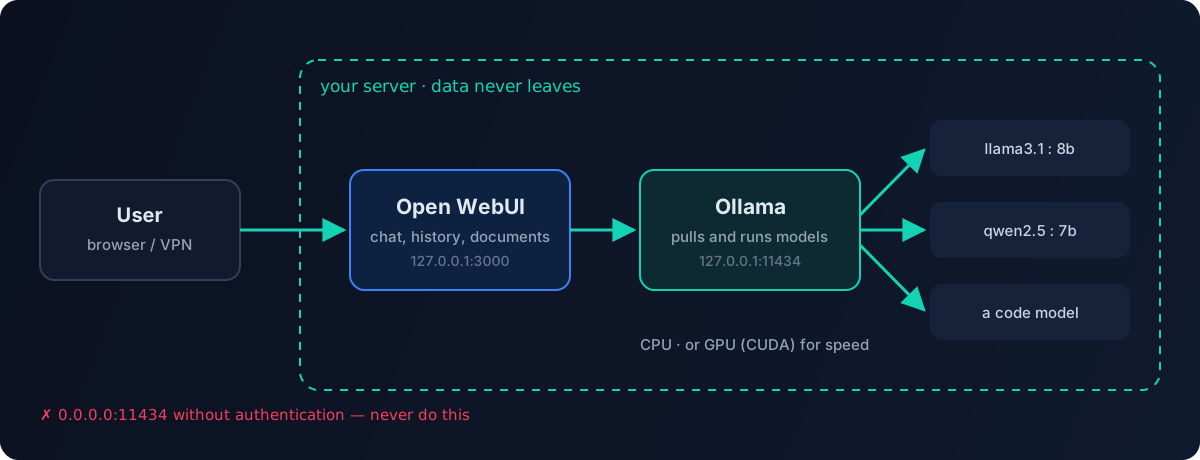
Cloud models are convenient, but in security you constantly deal with things that can’t be sent outside: logs, configs, customer data, audit results. For those tasks I keep a local LLM: the model runs on my own server, and not a single byte goes to a third-party provider. The setup is simple — Ollama runs the models, Open WebUI provides a ChatGPT-like web interface.
Hardware requirements
| What | Minimum |
|---|---|
| OS | Linux, e.g. Ubuntu 22.04+ |
| RAM | ~16 GB for 7–8B models |
| Disk | from 12 GB: Ollama and a couple of base models, then as much as your models need |
| CPU | 4+ cores, 8+ for 13B models |
| GPU | optional, but speeds up generation a lot |
A simple rule of thumb: a quantized 7–8 billion parameter model takes a few gigabytes and works fine even on a CPU. 30B+ models without a GPU with enough VRAM will answer very slowly. If you plan to use a GPU, install the NVIDIA drivers and CUDA first.
Installing Ollama
The official script installs the binary and the service:
curl -fsSL https://ollama.com/install.sh | sh
If you want your own control over the service — a dedicated user and a unit file:
sudo useradd -r -s /bin/false -m -d /usr/share/ollama ollama
# /etc/systemd/system/ollama.service
[Unit]
Description=Ollama Service
After=network-online.target

[Service]
ExecStart=/usr/local/bin/ollama serve
User=ollama
Group=ollama
Restart=always
RestartSec=3
Environment="OLLAMA_HOST=127.0.0.1:11434"
# For NVIDIA GPUs — faster generation:
# Environment="OLLAMA_FLASH_ATTENTION=1"

[Install]
WantedBy=default.target
sudo systemctl daemon-reload
sudo systemctl enable --now ollama
ollama --version
Models
ollama pull llama3.1:8b     # a general-purpose model
ollama pull qwen2.5:7b      # good with Russian and code
ollama list                 # what's downloaded
ollama run llama3.1:8b      # chat right in the terminal
How to choose:
- by task — for code and configs take code-focused models; for non-English texts, models with strong multilingual support;
- by hardware — start with 7–8B and only go bigger if the speed is acceptable;
- quantization —
q4/q5versions use several times less memory with a small quality loss.
The model catalog is on the Ollama website, along with the size of each version.
Open WebUI
The fastest way is the Docker image with Ollama built in:
# with GPU
docker run -d -p 127.0.0.1:3000:8080 --gpus=all \
  -v ollama:/root/.ollama -v open-webui:/app/backend/data \
  --name open-webui --restart always ghcr.io/open-webui/open-webui:ollama

# CPU only
docker run -d -p 127.0.0.1:3000:8080 \
  -v ollama:/root/.ollama -v open-webui:/app/backend/data \
  --name open-webui --restart always ghcr.io/open-webui/open-webui:ollama
If Ollama already runs as a service, use the regular open-webui:main image and point it at Ollama with the OLLAMA_BASE_URL variable.
The interface opens at http://127.0.0.1:3000. The first registered user becomes the administrator — register right after launch.
Besides chat, Open WebUI offers conversation history, multiple models, uploading documents to ask questions about them, users and roles.
Security — the most important part
The internet is full of guides that run Ollama with OLLAMA_HOST=0.0.0.0 and OLLAMA_ORIGINS=*. Don’t do that:
- The Ollama API has no authentication. If port
11434is open to the outside, anyone can use your server and download or delete models. Exposed Ollama instances are found by scanners en masse. - Listen on localhost only or on an internal address behind a VPN. If you need network access, put a reverse proxy with TLS and authentication in front and close the port with a firewall.
- Open WebUI should also be published only through a proxy with TLS, and open registration should be disabled once your users are created.
OLLAMA_ORIGINS=*allows any website in a browser to call the API — don’t enable it unless you need to.
Checking that nothing is exposed:
ss -tlnp | grep -E '11434|3000'
Both ports should listen on 127.0.0.1, not 0.0.0.0.
Where I use it
- analyzing logs and configs that can’t be sent to the cloud;
- drafting documentation and instructions from the internal knowledge base;
- agent experiments — a local model as a “free” worker for simple tasks.
Cloud models are still stronger for hard tasks, so I combine them: a local model for private and routine work, a cloud model for heavy analysis. How I choose models and count the money is covered in Cutting AI agent costs.