A second brain with AI: Claude, NotebookLM and Obsidian working together
Five thousand notes is a lot, but I'm still the one who has to read them. A combination of an agent, NotebookLM and Obsidian turns the vault into a 'second brain' that sorts the inbox, remembers context and answers from my own knowledge base.
Translated from the Russian original. Русская версия
I described how the vault itself is organized in How I organized my notes in Obsidian: PARA. This is the next step: how AI tools are connected to it and what work they took over.
The problem: writing is easy, sorting isn’t
I got used to writing in Obsidian long ago. The bottleneck was elsewhere:
- the inbox fills up faster than I can sort it;
- notes of different ages are formatted differently;
- to answer “how did I do this before” you have to remember where the note is;
- every new AI chat starts from zero — you have to explain the context again.
Three roles
The solution is to split the work between tools and give each one a single role.
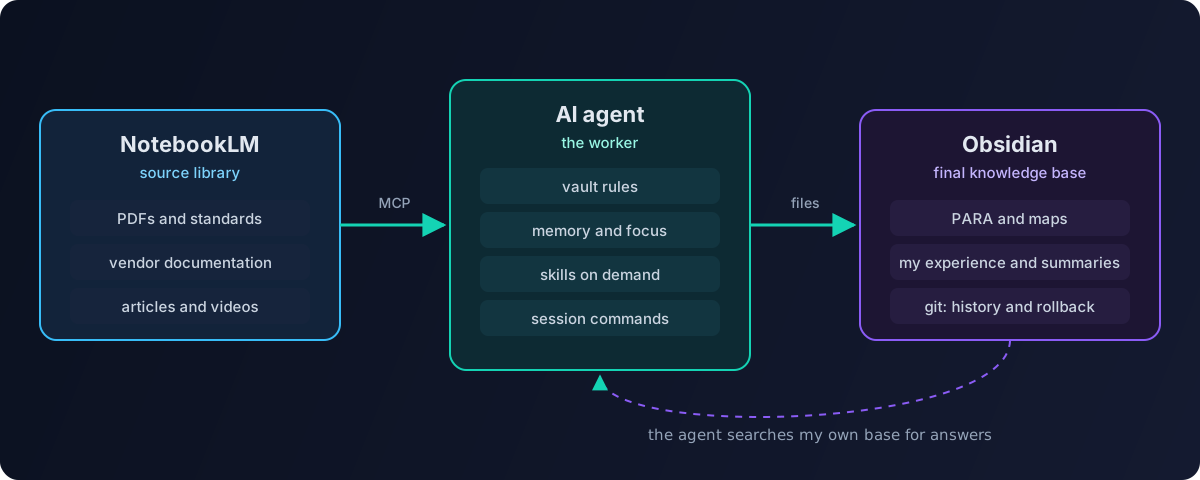
| Tool | Role | What it does |
|---|---|---|
| NotebookLM | source library | keeps raw materials — PDFs, documentation, long articles, videos; answers strictly from them, with citations |
| AI agent (Claude Code, opencode) | worker | reads and writes vault files, sorts the inbox, turns sources into notes |
| Obsidian | final knowledge base | only verified, formatted knowledge in my own structure |
The key principle: raw and processed don’t mix. A two-hundred-page standard or vendor documentation lives in NotebookLM — it’s convenient to ask questions about the original source there. Only the essence goes into Obsidian: “what I need from it and how I applied it”.
The agent works directly with files
An Obsidian vault is just a folder of markdown files. The agent doesn’t need any API: it opens the folder as a project and works with the files directly. For external sources such as NotebookLM or a browser, MCP servers are connected — the standard way to give an agent tools.
To keep the agent from turning the vault into a dump, its configuration lives at the vault root.
Vault rules
An instruction file the agent reads at the start of every session: the PARA folder structure, the tagging system, the map format, where to put different types of notes and what not to do — for example, deleting notes or touching the archive without confirmation.
Memory
The agent doesn’t remember past sessions, so memory is files:
- long-term memory — a short file with key facts: what I’m working on, which decisions were made, which conventions apply. It has a hard size limit of a few thousand characters. Without a limit, memory bloats and starts costing money in every request;
- current focus — what I’m working on this week;
- session summaries — after every session the agent writes a short summary: what was done, what was decided, what’s left.
A session start command loads the memory and focus; a session end command writes the summary and updates memory. A new chat no longer starts from zero.
Skills
A skill is an instruction for a specific type of task that the agent loads only when needed. I have two kinds of skills:
- utility — note normalization, working with the vault, memory sync, creating new skills;
- domain — what I do at work: bug bounty, server security audits, an Active Directory advisor, a Wazuh cluster advisor.
Domain skills rely on my own knowledge base: the AD advisor knows my CIS Benchmark notes and my rollout, so it answers in the context of my infrastructure rather than with generic advice from the internet.
The inbox pipeline
The most useful automation is sorting the inbox.
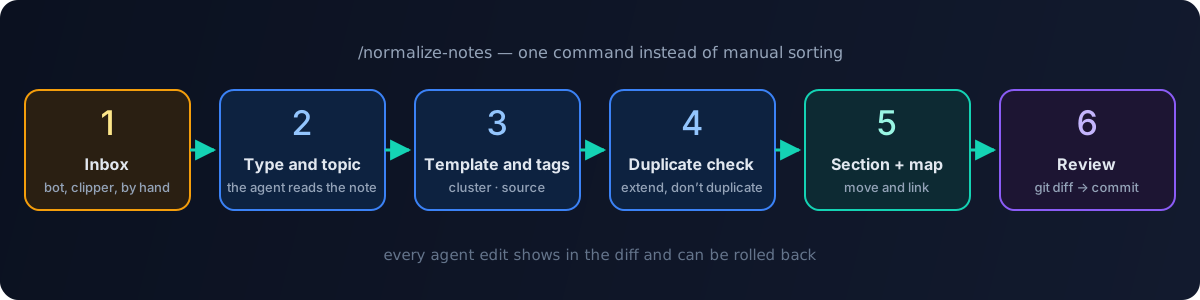
- A note lands in the Inbox — from a Telegram bot, a web clipper or by hand.
- The normalization command: the agent reads the note and identifies its type and topic.
- It applies the template: title, properties,
cluster/…andsource/…tags. - It looks for similar notes — extending an existing note beats creating a duplicate.
- It moves the note to the right section and adds a link to the section map.
- I review the changes as a git diff and confirm.
Step six matters: the vault lives in git, so any change the agent makes can be reviewed and rolled back. I trust the agent exactly as much as I can review and undo its work.
What works and what doesn’t
Works great:
- normalizing and sorting the inbox — saves hours a week;
- searching “how did I do this before” across the whole base;
- merging several notes into one structured note;
- drafting — including the articles on this blog, which grew out of my notes.
Works poorly or needs supervision:
- the agent tends to “improve” wording — unnecessary for personal notes, so rules have to restrain it;
- without limits, memory and rules grow and every request gets more expensive;
- private notes can’t be given to a cloud model — that’s what a local LLM is for.
On money specifically — I covered how not to overspend on agents in Cutting AI agent costs.
Summary
A “second brain” isn’t one magic program but a division of roles:
- NotebookLM remembers the sources;
- the agent does the routine by rules and skills;
- Obsidian keeps knowledge in my structure;
- git guarantees nothing gets lost.
Tools alone don’t make a knowledge base useful. Structure does — and the regularity that the agent now maintains.